

CDC National Healthcare Safety Network (NHSN) Digital Quality Measures (dQM) Content Package IG
3.0.0 - Release 3 - draft

CDC National Healthcare Safety Network (NHSN) Digital Quality Measures (dQM) Content Package IG
3.0.0 - Release 3 - draft
CDC National Healthcare Safety Network (NHSN) Digital Quality Measures (dQM) Content Package IG - Local Development build (v3.0.0) built by the FHIR (HL7® FHIR® Standard) Build Tools. See the Directory of published versions
| Page standards status: Informative |
This section of the implementation guide (IG) defines the specific conformance requirements for systems wishing to conform to this National Healthcare Safety Network (NHSN) Digital Quality Measures (dQM) Reporting IG. The bulk of it focuses on evaluating facility data against measure criteria and submitting those data to NHSN, though it also provides guidance on privacy, security, and other implementation requirements.
Before reading this formal specification, implementers should first familiarize themselves with the Use Cases page that describes the measure and reporting use cases this IG covers.
This IG uses specific terminology to flag statements that have relevance for the evaluation of conformance with the guide:
SHALL indicates requirements that must be met to be conformant with the specification.
SHOULD indicates behaviors that are strongly recommended (and which may result in interoperability issues or sub-optimal behavior if not adhered to), but which do not, for this version of the specification, affect the determination of specification conformance.
MAY describes optional behaviors that are free to consider but are not a recommendation for or against adoption.
This Implementation Guide (IG) profiles resources derived from US Core, QI Core and the HL7 NHSN dQM Implementation Guides and therefore inherits all applicable conformance requirements defined in those guides. In accordance with FHIR profiling rules, inherited constraints:
Specifically:
1 in a parent profile SHALL NOT be reduced.As a result, certain elements may be required or marked Must Support due to base IG conformance requirements, independent of whether NHSN reporting explicitly relies on those elements for measure calculation or submission validation.
To clearly communicate which data elements are relevant for NHSN dQM reporting, separate from inherited conformance obligations, this IG introduces an NHSN-specific notation: (NHSN-MS).
This designation is used solely to identify elements that NHSN considers necessary for reporting, validation, or measure processing, regardless of inherited cardinality or Must Support status.
This notation does not alter FHIR conformance semantics. Instead, it clarifies NHSN reporting expectations layered on top of inherited conformance requirements.
Elements that are relevant for NHSN reporting are identified by a MS flag in the Flags column and prefixing the element’s short description with the (NHSN-MS) notation. These elements will have a mouse hover message indicating "This element is Must Support for NHSN reporting."

Elements that are marked as Must Support and have no (NHSN-MS) notation, will have a mouse hover message indicating "Must Support in a base specification. NOT needed for NHSN reporting."
(NHSN-MS)The effect of (NHSN-MS) depends on the element’s minimum cardinality:
(NHSN-MS) + min = 1 The element is required. Absence of such an element in a submission will result in a pre-qualification issue, as described in the Validation and Pre-Qualification guidance.
(NHSN-MS) + min = 0 The element is considered Must Support for NHSN reporting and SHALL follow the Must Support guidance defined in this IG. It is expected when applicable.
No (NHSN-MS) designation If the element has a minimum cardinality of 0, its absence is acceptable for NHSN reporting and will not result in a pre-qualification issue.
| Condition | NHSN Expectation |
|---|---|
| [1..x] + (NHSN-MS) | Pre-qualification issue if missing |
| [0..x] + (NHSN-MS) | Expected when applicable; subject to Must Support processing rules |
| [1..x] + No (NHSN-MS) | Absence is acceptable |
| [0..x] + No (NHSN-MS) | Absence is acceptable |
The following rules regarding Must Support elements apply to all Profiles in this guide. The Must Support definitions are not inherited from other IGs, even for profiles in this guide that are derived from another guide.
Note: The profiles in this IG inherit from the US Core, which has some requirements that are more stringent than what is necessary for measure reporting (e.g. Practitioner references). This means that some inherited US Core required elements may not be used by NHSN and, if missing, may still pass NHSN ingestion validation.
This specification makes significant use of FHIR profiles to define the data requirements for measure-specific submissions.
The complete set of profiles defined in this IG can be found by following the links on the Artifacts page.
The following reporting scenarios use the Actors defined in the Actors and Use Cases page.
The general reporting workflows are detailed in the Reporting Scenarios section of the HL7 NHSN dQM Reporting Implementation Guide.
When NHSNLink acquires data from Facility Environment, both the NHSNLink and the NHSN application reside within an NHSN-controlled environment. NHSNLink first retrieves the latest FHIR measures and related resources from the measure source and extracts the data requirements for each measure. NHSNLink queries the data source for data; evaluates the data against a measure; prepares bundles containing MeasureReport and supporting resources; and then performs pre-qualification (see Validation and Pre-qualification tab). Additionally, it conducts measure-specific FHIR validation checks, before making the data available to NHSN back-end systems. In this scenario, the data source SHALL have a FHIR API that, at a minimum, provides read access to all resources required by the measure(s).
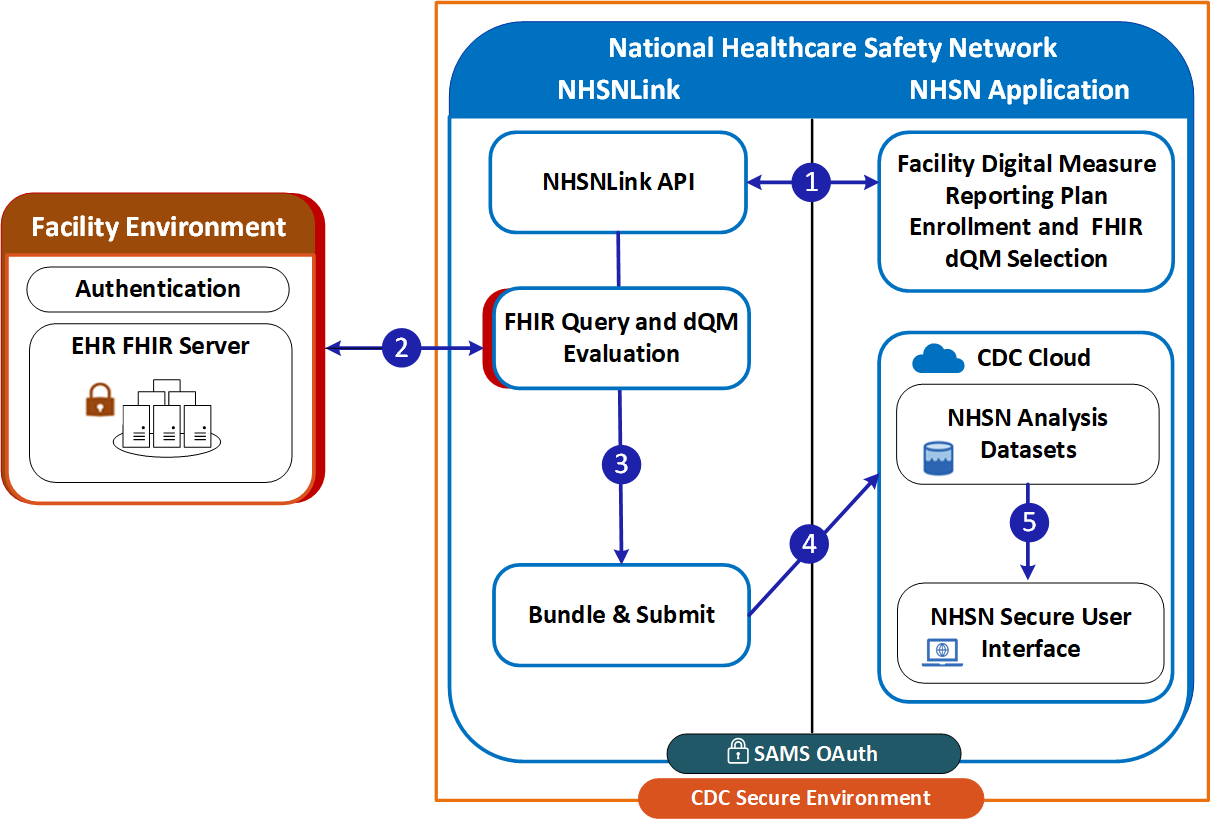
Figure 1 (above) illustrates the flow of data within and between the systems. NHSN is within the CDC Secure Environment. Under NHSN there are two systems: NHSN Application and NHSNLink. This process includes:
